Introduction to Book Cover Design
A course by Daniel Bolívar, Designer and Illustrator

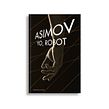

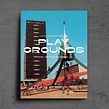

Learn the essentials to design the front cover of a book from start to finish
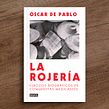
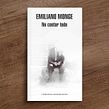


Do you want to create book covers that invite an audience to discover an unforgettable story? Learn how, with Daniel Bolívar, designer and art director for major publishing houses like Grupo Planeta and Penguin Random House.
In this course, Daniel guides you through the steps for designing your own book cover from start to finish. Learn each aspect to consider when creating your cover, including typography, color, and the photos and illustrations. Discover how the publishing industry works and learn the roles of editorials and authors. Alongside Daniel, you’ll understand the importance of analyzing a text and defining its genre and audience.
What will you learn in this online course?
18 lessons & 23 downloads
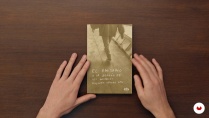





What's included in this course?
Meet Daniel, who tells you about his career as a designer and art director for major publishing houses. He shows you some book covers and analyzes the concept and design of each before revealing some of his industry references.
Discover the communicative potential of a book cover and learn the physical characteristics and finishes of a cover. Learn about editorials, authors, designers, book types, and readers to better understand the industry.
Choose a book, read and analyze the text you’ll convey in visual form, and evaluate what the project entails in terms of budget, time, and resources. Carry out a graphic and contextual investigation to brainstorm and find new ideas.
Next, it’s time to get started on your cover! Using your research, start sketching some ideas and choose the image that best represents the story. See the tools in Photoshop to apply color and learn the best way for working with typography (hierarchy, scale, etc).
Continue with additional steps for designing your cover image. Unite all the different elements and learn how to use InDesign for creating the entire sleeve, including the front cover.
Finish your book cover design with Daniel and get some advice on how to create a mockup of your cover that can be presented to an editor or included in your portfolio.
- 99% positive reviews (198)
- 4,671 students
- 18 lessons (2h 36m)
- 23 additional resources (6 files)
- Online and at your own pace
- Available on the app
- Audio: Spanish, English, French, Italian, Portuguese, Turkish
- Spanish · English · Portuguese · German · French · Italian · Polish · Dutch · Turkish
- Level: Beginner
- Unlimited access forever
Recommended software & tools for this course
 Adobe InDesign
 Adobe Photoshop
What is this course's project?
Design the front cover of your favorite book and create a mockup to present your proposal to a publishing house or include in your portfolio.

Projects by course students


Who is this online course for?
This course is for students, designers, and books lovers who pay special attention to book covers.
Requirements and materials
Basic design skills and basic notions of Photoshop and InDesign (or similar software) are required for this course.
As for materials, you will need a computer with Adobe Photoshop and InDesign (or similar).

Reviews

Daniel Bolívar
A course by Daniel Bolívar
Daniel Bolívar is a graphic designer who specializes in book cover design. Since graduating from the Arts and Design faculty at UNAM in Mexico City, he has been working as a designer and art director for major publishing houses like Grupo Planeta and Penguin House.
As an art director, he has worked on over two hundred book covers. He has also collaborated on projects with Tierra Adentro, Ediciones Hungría, Ediciones Antílope, and Alacraña.
Content
-
U1
Introduction
-
Presentation
-
Influences
-
What will we do in the course?
-
-
U2
The world of covers
-
What is a cover?
-
The finishes of the covers
-
X-ray of the publishing world
-
-
U3
Where do we start? Designing the cover of your favorite book
-
The book
-
Project evaluation
-
Graphic research
-
-
U4
Let's do it! Designing the cover of your favorite book
-
Conceptualization of the images and first sketches
-
The color
-
Typographic choice
-
Typographic choice 2
-
Creating the cover image
-
Creating the cover image 2
-
-
U5
Closing the book
-
Finishing the deck
-
Creation of mock-up or digital dummy
-
The design system: The collection
-
-
FP
Final project
-
Introduction to Book Cover Design
-
What to expect from a Domestika course
-
Learn at your own pace
Enjoy learning from home without a set schedule and with an easy-to-follow method. You set your own pace.
-
Learn from the best professionals
Learn valuable methods and techniques explained by top experts in the creative sector.
-
Meet expert teachers
Each expert teaches what they do best, with clear guidelines, true passion, and professional insight in every lesson.
-
Certificates
PlusIf you're a Plus member, get a custom certificate signed by your teacher for every course. Share it on your portfolio, social media, or wherever you like.
-
Get front-row seats
Videos of the highest quality, so you don't miss a single detail. With unlimited access, you can watch them as many times as you need to perfect your technique.
-
Share knowledge and ideas
Ask questions, request feedback, or offer solutions. Share your learning experience with other students in the community who are as passionate about creativity as you are.
-
Connect with a global creative community
The community is home to millions of people from around the world who are curious and passionate about exploring and expressing their creativity.
-
Watch professionally produced courses
Domestika curates its teacher roster and produces every course in-house to ensure a high-quality online learning experience.
FAQs
You’ll learn how to analyze, conceptualize, and create book covers using illustration, photography, visual composition, typography, and editorial finishes tailored to the book’s genre, audience, and context.
This is an intermediate-level course recommended for those with basic graphic or editorial design knowledge who want to deepen their skills in book cover creation.
You’ll need access to programs like Adobe InDesign and Photoshop, basic sketching materials, images, fonts, and, if possible, materials for physical finishes like laminates or varnishes.
You’ll learn to select typography based on the literary genre, target audience, and the book’s personality, applying conceptual, historical, and technical criteria to achieve effective visual communication.
Techniques taught include illustration, photography, collage, visual composition, texture application, graphic metaphors, and experimenting with special materials and finishes like stamping and laminates.
The course guides you in interpreting texts, analyzing characters and settings, and creating original visual concepts using metaphors, color, and composition to capture the essence of the book on its cover.
Yes, you’ll learn the importance of professional collaboration methods to ensure consistency between content, editorial direction, and graphic design of the cover.
 Adobe InDesign
 Adobe Photoshop
I really enjoyed this course and learned a lot. This is the type of work I want to do, and it definitely gave me the opportunity to start heading in that direction. Thanks a lot!
Técnicamente es un curso muy completo. Daniel Bolívar es conciso, detallista y con un gran conocimiento, así que el curso me ha resultado enriquecedor, provechoso y muy útil.
En la práctica, yo suelo utilizar Canva para crear las portadas de mis libros, así que muchas de las acciones que Daniel hacía en el programa de InDesign o Photoshop no he podido ponerlas en práctica. Aun así, ha sido fascinante verle trabajar, aprender de él y hacer uso de todo lo aprendido.
Seguiré trabajando...
Me encantó este curso, porque es justamente lo que yo estaba buscando para hacer la de mi propio libro en el género de relato autobiográfico. Hice una portada antes y me di cuenta de todos los errores que cometí. Ahora ya entendí qué debo de tomar en consideración antes de aventurarme en algún diseño, y estoy fascinada con el conocimiento que he adquirido. Muchas gracias al maestro por sus explicaciones claras y sencillas.
Muy buen curso para iniciarse en el diseño de portadas. Es práctico, claro y, sobre todo, las referencias que comparte Daniel son oro en polvo. Me dejó una muy buena base para seguir explorando este mundo!
Kurs interesujący. Niestety dużo traci na bardzo kiepskim tłumaczeniu. Mam nadzieję, że kiedyś Domestika znajdzie sposób na dobre tłumaczenie, ponieważ kursy tracą wiele ze swoich wartości w ten spósób.