Illustrated pattern design: Eye catching vector illustrations
A course by Nick Liefhebber, Illustrator




Create beautiful vector patterns with Adobe Illustrator and elevate your design skills to the next level.

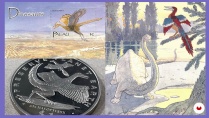
Immerse yourself in the world of illustration with Nick Liefhebber, an experienced and talented illustrator known for his vibrant and slightly psychedelic creations. In this online course, Nick will guide you through the process of creating captivating and infinitely repeatable illustrations.
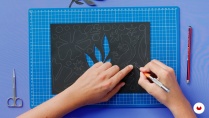
Throughout the course, you'll discover how Nick draws inspiration from the ever-changing and diverse elements of nature to build warm and intriguing compositions. You'll explore the unique combination of analog and digital techniques, starting with the creation of collages using paper items and then translating them into vectorial images.
In this creative journey, Nick will teach you how to choose a cohesive color palette, develop a motif, and create a balanced composition. From sketching to the final illustration, you'll learn how to refine your work and correct the mood of your designs. Additionally, Nick will provide insights into preparing your illustrations for printing and textile applications.
What will you learn in this online course?
14 lessons & 13 downloads
What's included in this course?
To start, you'll dive into the captivating world of illustration alongside Nick Liefhebber. He'll share his process of drawing inspiration from nature's elements and building collages with paper items. Through step-by-step guidance, you'll discover how to experiment and find the best solutions digitally.
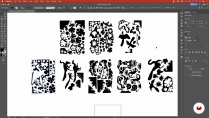
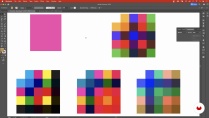
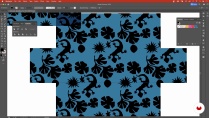
After creating collages, you'll explore the process of converting them into vectorial images, allowing for flexibility and scalability. Nick will demonstrate how to choose a cohesive color palette that enhances the organic feel of your illustrations. You'll also delve into motif development, discovering how to create balanced and visually appealing compositions.
Next, you'll learn the importance of sketching as a foundation for your illustrations. Nick will guide you through expanding your sketches into complete illustrations, refining the details and overall mood of your work. Additionally, you'll explore techniques for handling the edges of repetitive designs, ensuring a seamless and professional finish.
Finally, you'll gain insights into preparing your work for riso and screen printing, as well as textile uses. Nick will provide valuable tips on how to translate your illustrations onto various physical mediums, allowing you to bring your designs to life in different formats.
- 100% positive reviews (60)
- 2,546 students
- 14 lessons (2h 4m)
- 13 additional resources (3 files)
- Online and at your own pace
- Available on the app
- Audio: English
- English · Spanish · Portuguese · German · French · Italian · Polish · Dutch · Turkish · Romanian · Indonesian
- Level: Beginner
- Unlimited access forever
Recommended software & tools for this course
 Adobe Illustrator
What is this course's project?
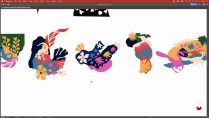
You'll have the opportunity to create a balanced composition by combining analog and digital tools. Drawing inspiration from the elements of nature and the techniques learned throughout the course, you'll develop a captivating illustration. The final project will allow you to showcase your unique aesthetic and the skills acquired during the course.

Projects by course students


Who is this online course for?
This course is perfect for aspiring illustrators, graphic designers, and creative individuals who want to explore the world of illustration and expand their skills. Whether you're a beginner or have some experience with Illustrator, Nick Liefhebber's guidance will help you refine your style and unlock your creative potential. Join this course to embark on a creative journey and discover the captivating art of illustration.
Requirements and materials
To fully participate in this course, it is recommended to have basic knowledge of Illustrator. Additionally, having access to art supplies such as paper, scissors, and glue will allow you to experiment with the collage technique. Immerse yourself in this creative adventure and bring your own colors and shapes to the world of illustration.

Reviews

Nick Liefhebber
A course by Nick Liefhebber
Nick Liefhebber is an accomplished illustrator renowned for his vibrant and slightly psychedelic illustrations. With a focus on creating warm and intriguing compositions, Nick draws inspiration from the ever-changing elements of nature.
His unique approach combines analog and digital techniques, allowing him to experiment with collages made from paper items and translate them into captivating vector patterns. Nick's illustrations are a testament to his creative vision and his ability to tell stories through shapes and colors.
Join Nick Liefhebber in this course to gain valuable insights from his extensive experience and learn how to create your own unique vector patterns. Discover the beauty of illustration and unleash your creative potential under Nick's guidance.
Content
-
U1
Introduction
-
About Me
-
Influences
-
-
U2
Preparing Your World
-
Defining Your World
-
Preparing the Collage Elements
-
Vectorizing
-
How to Use Color
-
Choosing the Way of Repetition for the Pattern
-
-
U3
Constructing Your World
-
Composing the Digital Collage
-
Building Your World
-
How to Deal with the Edges of a Repetitive Pattern 1
-
How to Deal with the Edges of a Repetitive Pattern 2
-
Setting the Mood with Colors
-
-
U4
Expanding Your World
-
Setting up the Project for Risograph or Screen Printing
-
All-over Print Products
-
-
FP
Final project
-
How to create illustrations and patterns for all kinds of applications
-
What to expect from a Domestika course
-
Learn at your own pace
Enjoy learning from home without a set schedule and with an easy-to-follow method. You set your own pace.
-
Learn from the best professionals
Learn valuable methods and techniques explained by top experts in the creative sector.
-
Meet expert teachers
Each expert teaches what they do best, with clear guidelines, true passion, and professional insight in every lesson.
-
Certificates
PlusIf you're a Plus member, get a custom certificate signed by your teacher for every course. Share it on your portfolio, social media, or wherever you like.
-
Get front-row seats
Videos of the highest quality, so you don't miss a single detail. With unlimited access, you can watch them as many times as you need to perfect your technique.
-
Share knowledge and ideas
Ask questions, request feedback, or offer solutions. Share your learning experience with other students in the community who are as passionate about creativity as you are.
-
Connect with a global creative community
The community is home to millions of people from around the world who are curious and passionate about exploring and expressing their creativity.
-
Watch professionally produced courses
Domestika curates its teacher roster and produces every course in-house to ensure a high-quality online learning experience.
FAQs
Yes, this course is designed for those with some experience in illustration or design who want to expand their skills in pattern creation, collage techniques, and digital workflows.
You’ll need basic art supplies for collage (paper, scissors, glue), a scanner or smartphone for digitizing artwork, and Adobe Illustrator or similar vector software for digital editing and pattern creation.
You will learn how to create original motifs using collage and paper cut techniques, digitize them, develop seamless repeatable patterns, choose cohesive color palettes, and prepare your designs for screen printing and textiles.
The course covers designing motifs, arranging elements for seamless repeats, using digital tools like Illustrator, and adjusting patterns for textile and product applications.
Yes, you’ll explore analog methods like paper cutting and collage, then move into digitizing and refining your designs with vector software.
You’ll learn to scan or photograph your hand-made collages, then use Illustrator’s tracing and editing tools to convert them into clean, scalable vector artwork for pattern design.
Yes, the course teaches how to separate color layers, adjust for ink overprints, and create print-ready files tailored for riso and screen print processes.
 Adobe Illustrator
Der Kurs ist sehr interessant. Collagen sind eine ideale Möglichkeit Muster zu entwickeln. Die Farbenvielfalt macht Spaß!
I love that this artist and teach uses cut paper as a base-device for creating their final digital artwork. Great teacher and course. The pattern-making parts are super helpful tools as well.
Der Kurs war echt super!
Very good ! Like it !
I'm enjoying this class! I particularly like the blend of analogue and digital. I like how the teacher reminds us that art does not need to be difficult.