Children's Illustration Techniques with Procreate
A course by Jelena Hallmann-Haeschke, Illustrator

Joined March 2022

Learn digital painting techniques to create a playful composition filled with fun characters and a lush background
Joined March 2022

Discover the vibrant world of children's illustration using Procreate, a versatile digital painting app. This course guides you through creating playful compositions brimming with joyful characters and enchanting backgrounds. Learn to set up your canvas, select a color palette, and explore Procreate's features to craft textures that bring your designs to life. You'll develop the skills to digitally sketch, apply color, and refine your images, creating pieces that resonate with a sense of wonder and imagination.
The final project involves designing a children's illustration ready for printing or inclusion in your portfolio. Gain insights into illustrating for kids and receive tips on showcasing your artwork effectively. Suitable for anyone with an iPad and the Procreate app, this course offers a chance to unleash your creativity and expand your digital art skills. Embrace the opportunity to bring out the child in you through art while building a portfolio that captures the essence of playful storytelling.
What will you learn in this online course?
12 lessons & 15 downloads
What's included in this course?
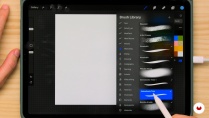
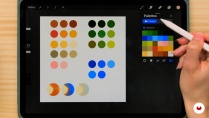
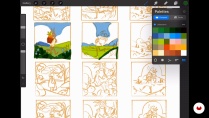
Discover the art of digital illustration using Procreate, where you'll explore techniques to create playful and imaginative compositions. Start by understanding the essentials of illustrating for children, including selecting suitable themes that captivate young audiences. Dive into Procreate to set up your canvas and develop a vibrant color palette that brings your ideas to life. As you progress, you'll learn to sketch a draft and refine your image with layers of color, incorporating texture through Procreate's versatile features.
Unleash your creativity by adding the finishing touches to your illustrations, enhancing their appeal and ensuring they are ready for printing or inclusion in your portfolio. Gain valuable insights on sharing your work effectively, showcasing your unique style and expanding your reach. Whether you're sketching joyful characters or crafting enchanting backgrounds, this journey offers a comprehensive guide to mastering digital painting techniques that evoke wonder and delight. Embrace the opportunity to express your artistic vision and develop a captivating portfolio that reflects your growth and skill.
- 100% positive reviews (5)
- 462 students
- 12 lessons (1h 35m)
- 15 additional resources (7 files)
- Online and at your own pace
- Available on the app
- Audio: English, German, Spanish (Latam), French, Italian, Polish, Portuguese, Turkish
- English · Portuguese · Italian · French · German · Polish · Turkish
- Level: Beginner
- Unlimited access forever
Recommended software & tools for this course
 Procreate
What is this course's project?
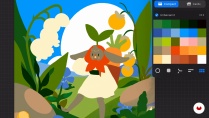
Create a vibrant children's illustration using digital painting techniques with Procreate. Craft playful compositions featuring joyful characters and lush backgrounds. The final project will be print-ready and a captivating addition to your portfolio.
Who is this online course for?
Aspiring illustrators, art enthusiasts, and digital creatives eager to explore children's illustration will enjoy this course. Those looking to enhance their skills in Procreate, create playful compositions, and expand their portfolio will find valuable insights and techniques here.
Requirements and materials
An iPad with Procreate installed is essential for creating digital illustrations. No extensive prior knowledge is needed, but a basic understanding of digital tools helps. Embrace creativity, explore playful compositions, and let your ideas come to life digitally.
Reviews

Jelena Hallmann-Haeschke
A course by Jelena Hallmann-Haeschke
Jelena Hallmann-Haeschke is an illustrator based in Stockholm, Sweden, currently working as an artist for a gaming company. She studied Illustration in Hamburg, where she earned her Bachelor’s degree after discovering the field shortly before graduating from high school, when an art teacher encouraged her to pursue it professionally.
Although she initially wasn’t sure what kind of illustrator she wanted to become, Jelena naturally gravitated toward children’s illustration. Over time, she embraced this direction, discovering a passion for creating playful characters and colorful worlds while collaborating with creative teams. Her work often features charming animals and vibrant compositions that balance creativity with accessibility for younger audiences.
Through her practice, Jelena has developed simple and efficient methods for creating concept illustrations quickly—approaches that can adapt to many styles and subjects. She enjoys sharing these techniques to help other artists build strong portfolio pieces while finding their own creative voice.
Content
-
U1
Introduction
-
About Me
-
Influences
-
-
U2
First Steps
-
Illustrating for Kids
-
The Motive: What to Draw?
-
Setting up Procreate
-
Finding a Color Palette
-
-
U3
Developing the Illustration
-
Sketching a Thumbnail
-
Coloring the Thumbnail
-
Putting Down Shapes
-
Adding Texture!
-
-
U4
Last Steps
-
Final Touches
-
Sharing and Posting
-
-
FP
Final project
-
Children's Illustration Techniques with Procreate
-
What to expect from a Domestika course
-
Learn at your own pace
Enjoy learning from home without a set schedule and with an easy-to-follow method. You set your own pace.
-
Learn from the best professionals
Learn valuable methods and techniques explained by top experts in the creative sector.
-
Meet expert teachers
Each expert teaches what they do best, with clear guidelines, true passion, and professional insight in every lesson.
-
Certificates
PlusIf you're a Plus member, get a custom certificate signed by your teacher for every course. Share it on your portfolio, social media, or wherever you like.
-
Get front-row seats
Videos of the highest quality, so you don't miss a single detail. With unlimited access, you can watch them as many times as you need to perfect your technique.
-
Share knowledge and ideas
Ask questions, request feedback, or offer solutions. Share your learning experience with other students in the community who are as passionate about creativity as you are.
-
Connect with a global creative community
The community is home to millions of people from around the world who are curious and passionate about exploring and expressing their creativity.
-
Watch professionally produced courses
Domestika curates its teacher roster and produces every course in-house to ensure a high-quality online learning experience.
FAQs
Yes, this course is designed for beginners and covers the basics of using Procreate to create engaging children's illustrations, including character and background design.
You’ll need an iPad with Procreate installed. No previous illustration experience is required. Optional: a stylus (like Apple Pencil) for better control.
You’ll learn to create expressive characters, design backgrounds, build mood boards, use bold colors, manage layers, and develop portfolio-quality children’s illustrations in Procreate.
Yes, the course teaches how to design illustrations and characters that are visually appealing and suitable for different children's age groups and interests.
The course walks you through extracting, organizing, and applying custom palettes from references to create vibrant, harmonious color schemes for children's art in Procreate.
Yes, you’ll learn to manage layers, use blending modes, and apply techniques like clipping masks to create depth, shading, and non-destructive edits in your artwork.
Absolutely. The course covers gathering and using personal photos and references to inspire your character and background designs, including making digital mood boards.
 Procreate
Learning a lot--great class!
I liked it very much. The colour she uses is great
Wonderful class with a very good teacher! Lessons are clear, fun and very informative, I'm learning quite a bit and it doesn't feel like a "chore." I highly recommend this class!
Great Teacher and easy to follow, hope this person creates more courses here.
Muy útil y fácil de aplicar su técnica para lograr una composición adecuada. Me encantó